Games-focused Android home screen replacement with built-in portal
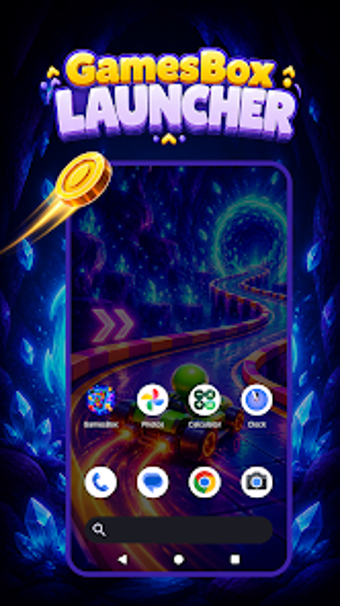
GamesBox Launcher, created by Atif ch, is an Android home screen replacement that turns a mobile desktop into a gaming-centric hub. It combines an integrated GamesBox portal for browsing multiple genres with standard launcher capabilities such as grid layout adjustment and gesture mapping. Key controls include per-home-grid customization, font choices, and a themed wallpaper collection. The app targets mobile gamers and Android users who want a dedicated, organized launcher that prioritizes access to games and entertainment apps.
What the launcher replaces and why it centers gaming
GamesBox Launcher replaces the system home app to present a gaming-first experience: the integrated GamesBox portal appears on the home screen alongside app icons, providing direct access to a multi-genre game library. The launcher also offers centralized app organization, so users can keep gaming and non-gaming apps in the same curated space while using the home screen as the primary game portal.
How much control it gives over home screen layout and appearance
The launcher exposes concrete layout controls, including a configurable grid for rows and columns and font customization. Users can define a 4x5 arrangement or other grid sizes via long-press layout settings, and exclusive GamesBox universe wallpapers let the device keep a consistent theme. Gesture setup further customizes navigation, giving both coarse and fine control over how users reach games and apps.
How easy it is to set up and use daily
Setup follows a standard home-app replacement flow on Android: install from the Play Store, set the launcher as the default home app, and adjust layout through long-press menu actions. Reverting to a previous launcher is possible through device settings, so users can test the launcher without a permanent change. These steps make the tool accessible to casual and experienced users who know basic Android launcher behavior.
Compatibility, updates, and the developer background
The launcher targets modern Android devices and is distributed through the Play Store, with regular updates noted for keeping pace with newer hardware. The developer publishes other Android utilities and casual games, which indicates ongoing maintenance and familiarity with personalization tools. Multi-device behavior and interaction with other desktop tools follow standard Android home app rules.
Clear fit for gamers who want a dedicated home screen
GamesBox Launcher is a focused option for mobile gamers who want direct, organized access to games from their home screen and granular control over layout and gestures. A practical tip: set up distinct grid profiles and assign a GamesBox wallpaper to reserve visual separation between play and daily apps. The launcher suits anyone seeking a gaming-first home experience, though users should plan to test and revert if they prefer their previous home app.